How to schedule a WhatsApp message with Prime Sender
March 28, 2026 · 12 min read

How to use the scheduler
Scheduling lets you send messages at a set time—even when you can’t be at your desk. Ideal for campaigns that need to go out at a specific hour.
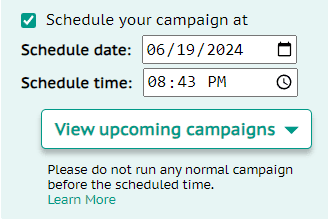
After you enter contacts and your message, pick the send time and click Schedule. You’ll get a confirmation notification.
You can also see the scheduled time inside the extension.
If you schedule a campaign for 9 PM, it starts the next time the clock hits 9 PM—once within the next 24 hours.
Important points
- • Keep the browser tab open at the scheduled time.
- • Don’t run another regular campaign before the scheduled time—it can interfere.
- • To cancel, close or refresh the tab.
- • Don’t close the tab while messages are sending.